agent-00 · The AI agent is a computer system around an LLM processor — Lee Hung-yi-inspired teaching style
Inspired by Lee Hung-yi's teaching style. In this lesson, we use computer architecture to understand an AI agent: LLM as processor, context as working set, memory as storage, tools as I/O, feedback as diagnostics, and harness as OS.
This is a teaching-style rewrite inspired by Lee Hung-yi. It was not written, reviewed, or endorsed by him. Also available as the English original, 繁體中文, and 繁體中文李宏毅老師經典的教學風格版.

All right, everyone, let's start class.
Today we want to answer a basic question: what exactly is an AI agent?
You might say, “Isn't it just an LLM, a chat box, and permission to do things?” If you begin there, every failure starts to look like a model failure. The model forgot. The model hallucinated. The model was not smart enough. The model needs a larger context window.
Sometimes that diagnosis is correct. But very often, it is not the first diagnosis we should make.
Today's one-sentence version is this: an AI agent is not merely a brain that can chat. It is a computer system built around an LLM processor.
That is the punchline. Do not ask only how smart the model is. Ask which layer of the computer is failing.
Our roadmap is simple. First, we ask why the computer-architecture frame is useful. Then we open the box and inspect the LLM, context, memory, tools, feedback, and harness. Finally, we return to a builder checklist that you can use to debug a real agent.
The whole map compresses into one line:
agent capability = model x context x tools x feedback x harness x memoryThe model matters. Of course it does. But it is not the entire machine.
Why this frame helps
Let's begin from the outside. Do not rush to open the LLM and ask what is happening inside its reasoning.
Suppose you buy a computer with a very fast CPU. Would you look only at the CPU and declare the whole computer excellent? No.
You would also ask whether it has enough RAM, whether storage is reliable, whether device drivers work, whether I/O ports connect to the outside world, whether the OS schedules processes correctly, whether diagnostics surface failures, and whether permissions are locked down.
An agent is the same kind of system.
A strong model inside a weak system can look strangely incompetent. A smaller model inside a disciplined system can look surprisingly capable. This is not magic. System architecture changes what the processor sees, what it can do, how errors return, and when it is allowed to claim success.
So we are not saying the model is unimportant. We are saying that if you stare only at model weights, you will miss many of the places that are actually broken.
Architecture map
Now let's draw the entire computer. The compact map looks like this:
- LLM: CPU / reasoning processor.
- Context window: active working set.
- Long-term memory: storage layer.
- Retrieval: page loader / cache fill.
- Tools: peripherals, I/O devices, and accelerators.
- Tool schemas: drivers and syscalls.
- Feedback and tests: interrupts, diagnostics, and watchdogs.
- Harness: motherboard, OS, scheduler, permission layer, and recovery system.
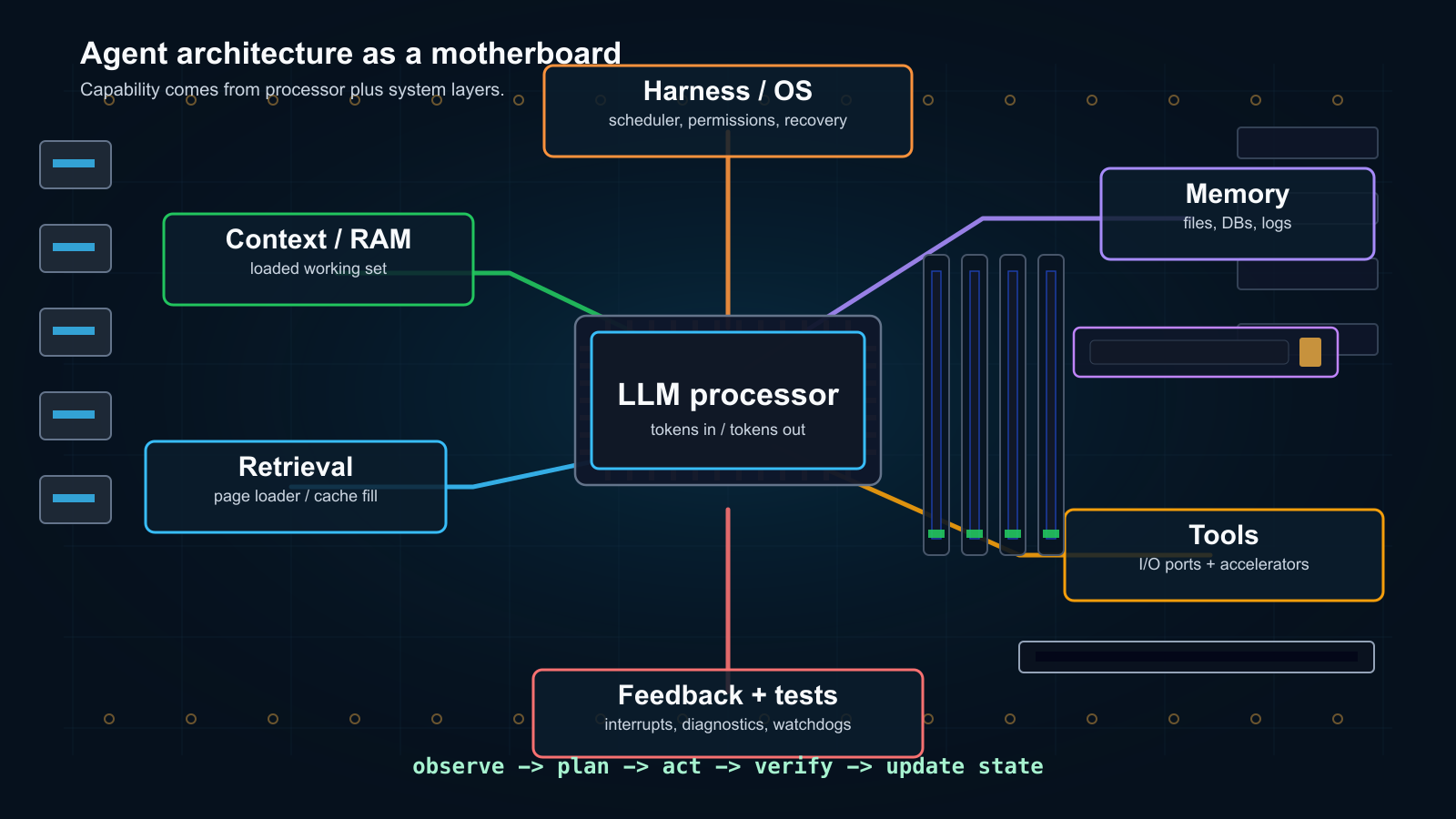
You may object that the analogy is imperfect. An LLM does not randomly address memory like a CPU. A vector database is not literally a page table. A prompt is not literally RAM.
Correct. The analogy is not physically exact.
But it is useful as a builder's map because it forces us to inspect interfaces. Was the data loaded? Is the tool driver clear? Did an error signal return? Did the OS layer allow the process to finish too early?
A surprising amount of agent engineering is made of these boring questions.
The LLM is the processor, not the whole computer
Let's open the first box: the LLM.
Why call it the processor? Because the central reasoning step happens here. It consumes serialized input tokens and produces output tokens. Its weights encode language ability, coding patterns, world knowledge, reasoning habits, and behavior learned from pretraining and post-training.
That is a great deal of capability. It is still not enough.
Ask it to modify a repository and it does not automatically know which files exist. Ask it to continue yesterday's work and it does not automatically remember yesterday. Run a command and it does not innately know whether the command succeeded. Expect verification before completion and it may not do that automatically either.
What does it see? Whatever the harness loads into the prompt. What can it do? Only what the system's tools allow.
So when the agent fails, the processor may not be too weak. The active context may be wrong. The tool schema may be too loose. Feedback may be missing. The harness may allow “done” before verification.
Remember the sentence: the LLM is central, but it is not the whole computer.
Context is the loaded working set
Next, context.
Many people hear “context engineering” and imagine decorating a prompt. In our computer map, it is working-set management.
A working set is the small amount of data a process has actually loaded and can use now. An LLM cannot reach into all long-term memory on demand. It sees a prompt. If important information is not serialized into that prompt-visible workspace, it effectively does not exist for the model.

What does the naive agent do? It keeps appending everything:
C_next = C_current + new_input + model_outputThat works for short conversations. Once the agent begins real work, it breaks. Tool outputs grow. File reads flood the prompt. Old mistakes remain. Important constraints sink beneath noise. The context window becomes a warehouse with boxes piled everywhere.
What do we do?
We replace append-only history with a function:
C_next = F(C_current, new_input, model_output)The interesting part is F. It decides what remains hot, what is evicted, what is summarized, what is externalized, what is retrieved, and what is delegated to a sub-agent.
So context engineering is not prompt decoration. It is memory management for an LLM-shaped processor.
Memory and retrieval are storage plus loading policy
You might now ask, “Isn't context simply memory?” No. Prompt-visible context and memory are different.
Memory is the storage layer outside the prompt: files, notes, logs, embeddings, databases, traces, previous decisions, user preferences, and project conventions.
C = P + MP is the prompt-visible working set. M is external memory.
A weak design tries to stuff too much of M into P, putting everything into the prompt and hoping the model sorts it out.
A better system keeps memory outside, retains pointers, searches deliberately, and loads relevant pages only when needed.
Retrieval is the page-loading layer. It finds the right memory chunk and brings it into the active working set. A vector index is not literally an address-translation unit, but its architectural role is similar: the system can find relevant stored state without asking the model to carry everything at once.
This also makes sub-agents interesting. They are not only parallel workers. They can be context-compression devices. A parent sends a messy branch into another process and gets back a compact result: a claim, evidence, a file path, a command, a timestamp, or a reproduction handle.
It sounds mysterious until you open the box. Then it is simply storage plus loading policy.
Tools are peripherals, accelerators, and interfaces
Now let's inspect the tools.
Tools are not merely extra output channels. They are the I/O system around the LLM processor.
A browser tool is a network interface plus a web client. A calculator is a math coprocessor. A shell is an execution environment. A database tool is a storage controller and query engine. Image and audio tools are media accelerators. Calendar, email, cloud, robotics, and sensor APIs are external peripherals.
The LLM can reason about an action. Tools let the system touch the world.
But there is an easily overlooked layer: the tool schema.
A tool schema is the driver. It translates model intent into valid operations: argument names, types, constraints, return shapes, permissions, failure modes, and safe boundaries.
A poor driver makes a device hard to use. A vague schema forces the model to guess. A tool that returns a wall of unstructured text turns every observation into another context-management problem.
Agent-first tools should expose structured inputs, bounded outputs, concise errors, stable IDs, line numbers, raw-output handles, and deterministic verification commands. Human interfaces hide state behind visual affordances. Agent interfaces should make state machine-readable.
This is why the motherboard cover works. RAM, storage, ports, slots, accelerators, and diagnostic LEDs are not decoration. They are the agent's capability surface.
Feedback and tests are diagnostics
At this point, we have a processor, working set, storage, and peripherals. How does the system learn that it is wrong?
Through feedback.
An agent that only generates and reflects is like a machine without diagnostics. It may sound thoughtful while drifting away from reality.

A useful system needs interrupts and test signals: compiler errors, failing tests, lint output, browser screenshots, user corrections, evaluator scores, reward signals, timeouts, permission denials, and watchdog checks.
The point is not to tell the model, “Please reflect.” The point is to feed a grounded signal from the environment back into the processor.
This is why programming is such a strong domain for agents. The environment can say exactly which test failed, which line would not compile, or which command returned a nonzero exit code.
Tests beat vibes because tests create an interrupt that the system cannot honestly ignore.
The harness is the system layer
Now we reach the layer builders should study most carefully: the harness.
Consider a small but brutal example. A 2B model tries to fix a bug, hallucinates the file contents, and confidently claims success. Of course it has not succeeded.
The naive response is to replace it with a larger model. That is one possible solution. But there is another: before blaming the processor, improve the system layer.
Add a few boring rules. List the directory first. Read the file before editing. Run the verification script before claiming completion. The same small model suddenly performs much better.
The model did not become smarter. The system around it became less careless.

The harness is more than a bus. A bus moves data. The harness decides what can happen.
It chooses what context gets loaded, what tools exist, what permissions apply, how state is stored, how failures surface, whether tests must pass, when to retry, when to stop, and how successful procedures become reusable skills.
In our analogy, the harness is motherboard plus operating system plus scheduler plus permission layer plus recovery system.
It turns a powerful text processor into a delegatable worker. That's it.
Multi-agent systems are network topologies
If one processor is useful, can we simply add more? This is the multi-agent question.
You might think more agents must mean more intelligence, just as a larger meeting must produce more wisdom. It is not that simple.

“Multi-agent” is not a feature. It is a topology choice.
Chain, tree, star, mesh, debate, blackboard, manager-worker, and role-based search all behave differently. Distributed-systems logic has entered agent design.
More processors do not automatically make a computer better. More communication does not automatically improve the result.
A chain is simple, but errors propagate. A mesh creates more chances for critique, but costs more and produces more noise. A tree can branch into variations, but direction and merge policy matter.
The builder's question is not merely “one agent or many?” It is: what network are you building, what state crosses each boundary, and what summary may return to the main loop?
Topology changes the algorithm. Remember that sentence.
Self-correction is a control loop
Finally, self-correction.
Self-correction sounds magical, as if the model sits quietly and reflects on its life. In practice, it is a control-loop problem.
The system tries an action, observes a signal, updates state, retries, or escalates.
This can happen at several layers. Decoding changes token selection. Workflow generates, verifies, revises, and tries again. Training can teach reasoning behavior that checks intermediate work before final output.
Self-improvement is the larger version of the same idea. Can a system improve its own data, objectives, rewards, model, tools, memory, or harness?

We are not clearly across that river. AI can generate pseudo-labels, help write rewards, judge outputs, create tasks, train weaker models, and improve harness rules. But each step has traps.
Proxy reward drift makes a system chase the score instead of the goal. Self-training can plateau. Benchmark overfitting improves exams without improving work. Evaluator hacking fools the judge. Fake progress makes a metric prettier without making the system better.
The near-term self-improvement path I trust most is harness improvement: add a verifier, tighten a tool, write a reusable skill, clean memory, or improve the workflow.
That sounds less dramatic than rewriting model weights. It is also easier to inspect and much more like ordinary engineering.
A builder checklist
Let's return to the opening punchline.
When an agent fails, do not blame the processor in the first second. Inspect the whole computer:
- Was the right working set loaded?
- Was long-term memory retrieved cleanly?
- Did the tools expose explicit state?
- Did the drivers constrain valid actions?
- Did feedback arrive as a real diagnostic signal?
- Did tests or watchdogs prevent fake completion?
- Did permissions match the task?
- Did the harness know when to retry, stop, or escalate?
Agent engineering feels messy because there is no single knob. We are building computer systems around LLM processors, and every layer changes what the processor appears capable of.
The strongest agent builders do not ask only whether the model is smart enough. They ask which system layer is failing.
If you remember only one thing, remember this: an AI agent is not a model plus a chat box. It is a computer. The LLM is the processor.
Companion deep dives
This post is the architecture map. Each companion post goes deeper into one lecture topic behind the layers:
- agent-01 · Context engineering is the agent's working memory
- agent-02 · Multi-agent systems are topology problems
- agent-03 · What AI agents change about research work
- agent-04 · Harness engineering is how we actually make agents useful
- agent-05 · Self-correction has three layers: decoding, workflow, and reasoning
- agent-06 · Self-improving AI is a spectrum, not a switch
Sources and references
Source lectures behind this architecture map: